

Settings reference
Descriptions of all Version Forge settings on the project settings page.
Settings are saved to Config/DefaultVersionForge.ini and should be checked in to source control.
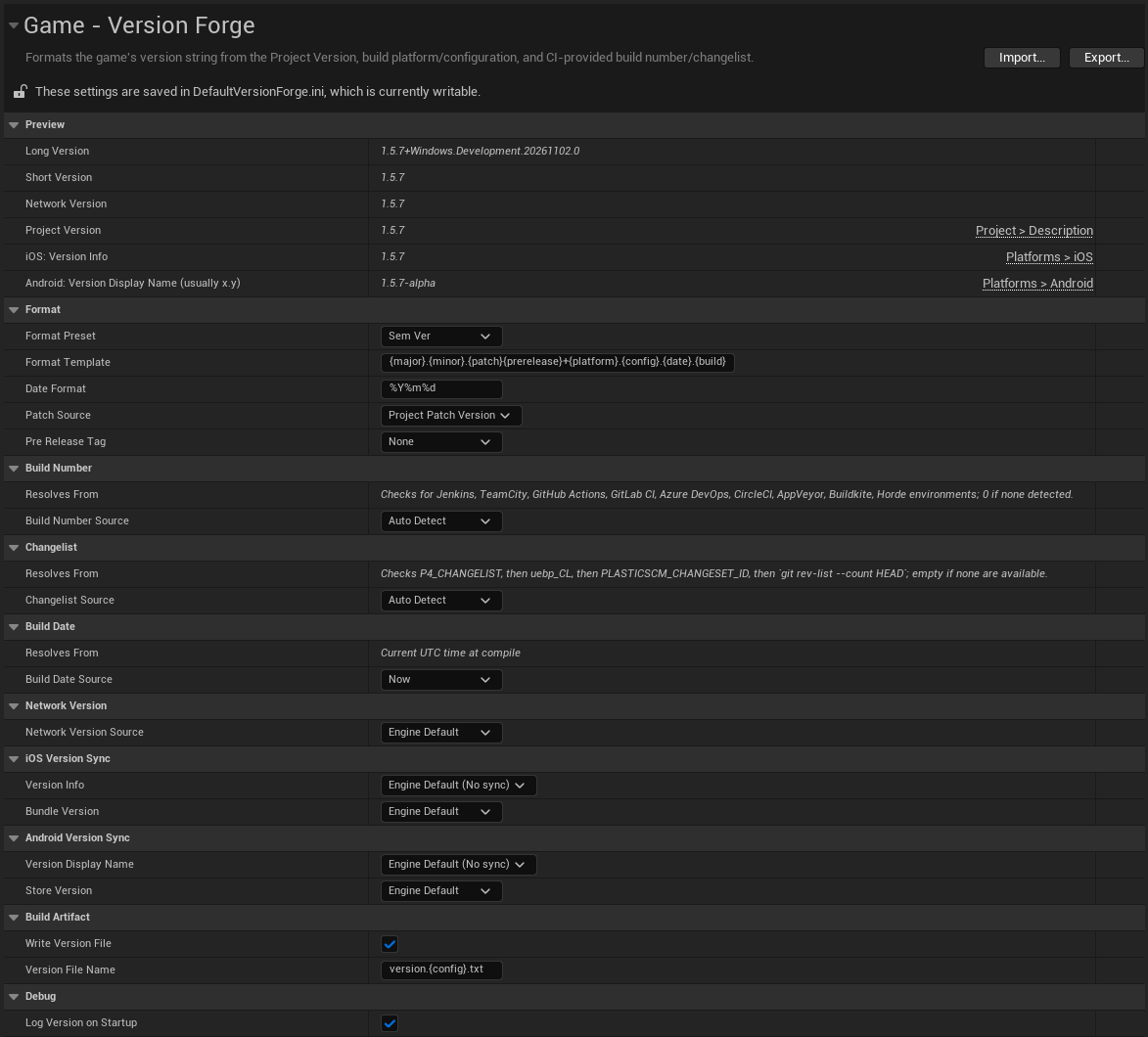
Preview
| Setting | Description |
|---|---|
| Long Version | Preview of the formatted full version string using current settings. |
| Short Version | Preview of the formatted short version string using current settings. |
| Network Version | Preview of the formatted network version string using current settings. |
| Project Version | The current value of the Project Version setting, with shortcut. |
| iOS: Version Info | The current value of the iOS Version Info setting, with shortcut. |
| Android: Version Display name | The current value the Android Version Display Name setting, with shortcut. |
Format
| Setting | Default | Description |
|---|---|---|
| Format Preset | SemVer | Built-in formatting templates for the version string. Choose Custom to define your own template. |
| Format template | Set by the Preset | Token template for the full version string. |
| Date Format | %Y%m%d | The FDateTime::ToString pattern for {date}. Varies by preset. |
| Patch source | Project Patch Version | Where the {patch} value is resolved from. |
| Pre Release Tag | None | Optional label: alpha, beta, rc, ea, or Custom. |
| Custom Pre Release Tag | Empty | The label to use when Pre Release Tag is Custom. |
Build Number
| Setting | Default | Description |
|---|---|---|
| Build Number Source | Auto Detect | Where the build number is pulled from. |
| Build Number Env Var | BUILD_NUMBER | The variable to read when the source is Environment Variable. |
| Build Number Arg Name | BuildNumber | The argument to read when the source is Command Line Argument. |
Changelist
| Setting | Default | Description |
|---|---|---|
| Changelist Source | Auto Detect | Where the changelist or commit identifier is pulled from. |
| Changelist Env Var | P4_CHANGELIST | The variable to read when the source is Environment Variable. |
| Changelist Arg Name | Changelist | The argument to read when the source is Command Line Argument. |
Build Date
| Setting | Default | Description |
|---|---|---|
| Build Date Source | Now | Where the build date comes from. |
| Build Date Env Var | BUILD_DATE | The variable to read when the source is Environment Variable. |
| Build Date Arg Name | BuildDate | The argument to read when the source is Command Line Argument. |
Network Version
| Setting | Default | Description |
|---|---|---|
| Network Version Source | Engine Default | What Unreal's network check compares. |
| Network Version Template | {major}.{minor}.{patch} | Same tokens as Format Template. Shown only when the source is Custom Template. |
| Apply Network Version In Editor | Off | Applies your network setting in the editor, including Play In Editor. Restart the editor after changing it. |
iOS Version Sync
| Setting | Default | Description |
|---|---|---|
| Version Info | Engine Default (No sync) | What to write into iOS VersionInfo when CI builds for iOS. |
| Bundle Version | Engine Default | Set where CFBundleVersion is sourced from. |
| Bundle Version Env Var | STORE_VERSION | The variable to read when Bundle Version is Environment Variable. |
| Bundle Version Arg Name | StoreVersion | The argument to read when Bundle Version is Command Line Argument. |
| Bundle Version Offset | 0 | A number added to the resolved value if you need to offset it. |
Android Version Sync
| Setting | Default | Description |
|---|---|---|
| Version Display Name | Engine Default (No sync) | What to write into Android VersionDisplayName when CI builds for Android. |
| Store Version | Engine Default | Where StoreVersion (the versionCode) is sourced from. |
| Store Version Env Var | STORE_VERSION | The variable to read when Store Version is Environment Variable. |
| Store Version Arg Name | StoreVersion | The argument to read when Store Version is Command Line Argument. |
| Store Version Offset | 0 | A number added to the resolved value if you need to offset it. |
Build Artifact
| Setting | Default | Description |
|---|---|---|
| Write Version File | On | Packages a text file containing the version string with packaged builds. |
| Version File Name | version.{config}.txt | The file name format to write the version file to. |
Debug
| Setting | Default | Description |
|---|---|---|
| Log Version On Startup | On | Writes the version string to the Output Log when the game starts. |